
7 Best Kids Tablet for 3 Year Old Parents Love
Finding the perfect tablet for a three‑year‑old can feel like navigating a maze of bright screens, flashy ads, and endless features, but the right device can turn screen time into a safe, educational adventure that supports early learning and creativity. Parents care about durability, parental controls, age‑appropriate content, and battery life, because a tablet that can survive a toddler’s enthusiastic handling while protecting them from unsuitable material is worth its price. In this post we’ve hand‑picked and tested the top seven kids tablets that excel in those areas, breaking down each model’s strengths, drawbacks, and price points so you can make a confident, informed choice. Let’s dive in.
7 Top Kids Tablets for 3-Year-Olds – Our Expert Picks
We’ve carefully evaluated features, durability, and parental controls to bring you the most reliable tablets for curious three‑year‑olds.
7. Amazon Fire HD 8 Kids (Disney Princess Edition)
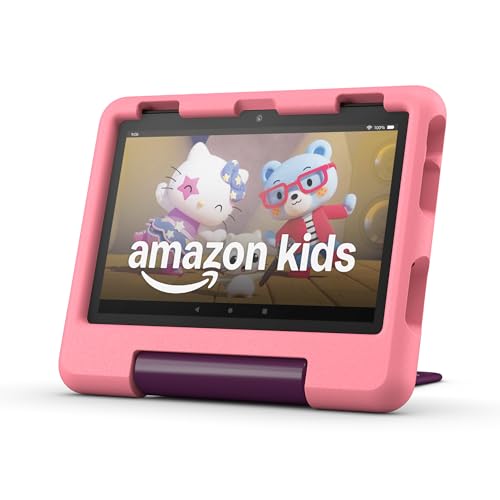
The Amazon Fire HD 8 Kids tablet (2024 model) is a full‑featured, kid‑friendly tablet designed for ages 3‑7. Its bright 8‑inch HD screen and 3 GB of RAM deliver smooth, responsive performance for books, games, videos, and music, while the 32 GB of internal storage (expandable up to 1 TB) gives plenty of room for your child’s growing library. The bundle saves up to $100 by including a 1‑year Amazon Kids+ subscription, a rugged Kid‑Proof case, and a 2‑year worry‑free guarantee—so you get a real tablet, not a toy, with protection against drops and bumps. Parents enjoy easy‑to‑use parental controls that let you set time limits, approve content, and review activity from anywhere. With up to 13 hours of battery life, the tablet can keep up with a full day of learning and play, and the Amazon Family Trust team ensures the ecosystem meets high safety and privacy standards. The Disney Princess theme adds a magical touch that kids love.
Pros
- Huge value bundle – tablet, Kid‑Proof case, and 1‑year Kids+ for a fraction of the separate price.
- Durable & worry‑free – strengthened aluminosilicate glass, drop‑resistant case, and a 2‑year guarantee.
- Robust parental controls & safe content – ad‑free Kids+ library, activity reports, and time‑limit settings.
Cons
- Subscription auto‑renewal – after the first year, Kids+ renews at $5.99/month (cancellable anytime).
- Base storage may fill quickly – 32 GB can be limiting for heavy media use without an optional microSD expansion.
6. LeapFrog LeapPad 7″ Kids Tablet

The MengDash 7‑inch Kids Tablet is built for curious hands and growing minds. Its 1024 × 600 IPS HD touchscreen delivers crisp, eye‑friendly visuals, while a quad‑core 1.6 GHz (up to 1.8 GHz) processor runs Android 11 smoothly. Kids can explore the full Google Play Store, watch YouTube, and connect via Wi‑Fi or Bluetooth, all from a device that feels like a mini‑smartphone but is sized just right for little fingers. The pre‑installed iWawa Toddler app puts a safe “child mode” at the tap of a button, offering mini‑games, educational videos, arithmetic practice, and digital painting—all under parental‑control settings. A 3000 mAh battery powers up to five hours of continuous reading or video playback, and 3 GB RAM with 32 GB internal storage (expandable to 1 TB via microSD) ensures plenty of space for cartoons, e‑books, and photos. The rugged case doubles as a neck‑strap or car‑hanger, keeping the tablet within reach yet protected from drops. Brightness is adjustable for comfortable viewing, making it a perfect travel companion for camping trips, flights, or daily commutes.
Pros
- Full Android experience – Google Play, YouTube, Wi‑Fi & Bluetooth give kids a real‑world smart device in a safe package.
- Robust parental controls – iWawa’s child mode curates educational content and lets parents lock settings.
- Long‑lasting battery & massive storage – 5 hrs of use plus up to 1 TB expandable memory for endless entertainment.
Cons
- Battery life may feel short on all‑day outings; a spare charger is advisable.
- Screen size is modest for older children (9‑10 yr), who might outgrow the 7‑inch display quickly.
5. Amazon Fire HD 10 Kids tablet.

The Amazon Fire HD 10 Kids tablet (newest model) is a full‑featured, kid‑proof tablet designed for ages 3‑7. Its bright 10.1‑inch 1080p HD screen brings Disney, PBS Kids, and other favorite shows to life, while 3 GB of RAM delivers smooth performance—up to 25 % faster than the previous generation. The included 1‑year Amazon Kids+ subscription unlocks thousands of ad‑free books, games, videos, and educational apps, all curated from trusted brands. Robust parental controls let you set screen‑time limits, pause the device, and approve app requests right from your phone. With a 13‑hour battery, 32 GB internal storage (expandable up to 1 TB), and a durable kid‑proof case, the tablet is ready for any adventure, and the 2‑year worry‑free guarantee means a replacement if it ever breaks.
Pros
- All‑in‑one bundle – tablet, 1‑year Kids+ subscription, and protective case save up to $70 versus buying separately.
- Parental peace of mind – comprehensive controls and age‑based filters keep content safe and appropriate.
- Long‑lasting power & storage – 13‑hour battery and expandable storage let kids enjoy books, movies, and games on the go.
Cons
- Subscription renewal – after the first year, Kids+ automatically renews at $5.99/month (cancellable).
- Expandable storage sold separately – you’ll need to purchase a microSD card if you want the full 1 TB capacity.
4. Bravokids 10 Inch LCD Writing Tablet

The Bravokids 10‑inch LCD Writing Tablet is a vibrant, eye‑protection color screen that lets children ages 3‑8 unleash their imagination without the glare or radiation of traditional screens. The 10‑inch colorful display mimics real paper, and the pressure‑sensitive stylus creates lines of varying thickness—just like a real pen or pencil. With a single press of the erase button, the entire screen clears in one second, while the lock key lets kids preserve their masterpieces for later. Built from durable, shock‑resistant plastic with rounded corners, the tablet weighs only 150 g, making it easy to slip into a backpack or travel bag. Over 100,000 rewrites mean thousands of sheets of paper are saved, helping protect the environment. The quiet, battery‑powered design lets kids doodle silently on planes, in cars, or at the restaurant, turning any moment into a creative one. A secured screw‑fastened battery door adds an extra layer of safety, making it an ideal educational gift for birthdays, holidays, or back‑to‑school celebrations.
Pros
- Eye‑friendly, glare‑free screen – safe for long‑term use.
- Eco‑friendly – up to 100,000 rewrites replace countless sheets of paper.
- Portable & rugged – lightweight, shock‑proof design with rounded corners.
Cons
- Requires occasional battery replacement (no rechargeable option).
- Limited to monochrome drawings; no color pen input.
3. Trayoo Kids 7 Tablet

The Trayoo Kids Tablet is a 7‑inch, kid‑friendly powerhouse that combines durability with a smooth, fast performance. Its quad‑core processor delivers up to 30 % faster app loading, while 2 GB RAM and 32 GB internal storage (expandable to 64 GB) give plenty of room for games, videos, and photos. The upgraded battery lasts up to 10 hours, perfect for road trips or flights. A shock‑proof case with an adjustable stand protects the device from drops and makes it easy for little hands to hold at any angle.
Pre‑installed Yu babe offers thousands of educational apps—Montessori activities, brain‑training games, painting tools, and kids’ TV—that work offline, so learning never stops even without Wi‑Fi. Parents can download additional apps like YouTube Kids or ABC Mouse from Google Play. The built‑in parental‑control mode lets you create separate profiles, block or allow apps, filter content, and set screen‑time limits, giving each child a safe, personalized digital world. Dual cameras, Wi‑Fi, and Bluetooth round out the feature set, making the tablet ready for both play and learning.
Pros
- Fast, smooth performance with a quad‑core CPU and 2 GB RAM.
- Robust parental controls for multiple child profiles, app blocking, and screen‑time limits.
- Durable, kid‑proof case with a stand that absorbs drops and lets kids view content hands‑free.
Cons
- Small removable parts may pose a choking hazard; not suitable for children under 3 years.
- Requires the original charger for optimal performance; using third‑party chargers may affect battery health.
2. Amazon Fire 7 Kids Tablet
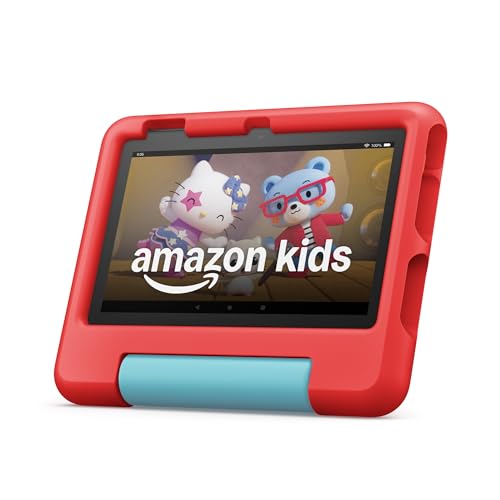
The Amazon Fire 7 Kids tablet (newest model) is the best‑selling 7‑inch tablet for ages 3‑7, and it’s more than a toy—it’s a full‑featured device packed with ad‑free, kid‑safe content. The bundle saves up to $70 by including a 1‑year Amazon Kids+ subscription and a rugged kid‑proof case, all backed by a 2‑year worry‑free guarantee. Parents love the intuitive Parent Dashboard, which lets you filter content by age, set educational goals, limit screen time, and even grant access to Netflix or Disney+. With up to 10 hours of battery life, 16 GB of internal storage (expandable to 1 TB), and a sturdy case that survives drops, the tablet is ready for learning, play, and on‑the‑go adventures. Amazon Kids+ brings thousands of ad‑free books, games, videos, and apps from trusted brands like Disney, Nickelodeon, and PBS Kids, plus STEM and language‑learning activities. Safety is front‑and‑center, thanks to partnerships with leading family‑trust experts.
Pros
- Huge value: tablet, 1‑year Kids+ subscription, and protective case for a single price.
- Parental peace of mind: robust, easy‑to‑use controls and a 2‑year replacement guarantee.
- Durable & portable: rugged case, 10‑hour battery, and expandable storage for endless content.
Cons
- After the first year, the Kids+ subscription auto‑renews at $5.99 +/month (cancellable anytime).
- Base storage is 16 GB, which may require a microSD card for heavy app or media libraries.
1. Amazon Fire 7 Kids Tablet (Newest Model)

The Amazon Fire 7 Kids tablet (newest model) is the top‑selling 7‑inch tablet for children ages 3‑7, and it’s designed to grow with them. Out of the box you get a full‑featured tablet—not a toy—paired with a 1‑year Amazon Kids+ subscription and a rugged kid‑proof case, saving you up to $70 versus buying each piece separately. The vibrant purple design hides a durable, drop‑tested case that protects the device through the inevitable bumps of daily play. With a 10‑hour battery, 16 GB of internal storage (expandable up to 1 TB via microSD), and ad‑free, curated content from Disney, Nickelodeon, PBS Kids, and more, kids can explore books, games, videos, and educational STEM activities without interruptions. Parents enjoy a hassle‑free dashboard that lets you set age‑appropriate filters, screen‑time limits, and educational goals, plus the option to unlock extra services like Netflix or Disney+. Backed by a 2‑year worry‑free guarantee, the Fire 7 Kids tablet offers peace of mind and a safe, engaging digital world for young learners.
Pros
- All‑in‑one bundle: tablet, 1‑year Kids+ subscription, and protective case for a great value.
- Robust parental controls: intuitive dashboard for content filtering, time limits, and goal tracking.
- Durable and portable: kid‑proof case and 10‑hour battery keep it ready for any adventure.
Cons
- Subscription renewal: after the first year, Kids+ automatically renews at $5.99 +/month (cancellable).
- Limited internal storage: base model offers 16 GB, which may require a microSD card for heavy media libraries.
Buying Guide
When choosing a tablet for a three‑year‑old, prioritize safety, ease of use, and durability, as young children need a device that withstands rough handling while offering age‑appropriate content.
- Build quality and rugged design: Look for reinforced corners, a rubberized case, and a screen that can survive drops and spills.
- Parental controls and child‑friendly interface: The tablet should offer a simple home screen, secure app management, and time‑limit settings that you can lock with a password.
- Content ecosystem and educational apps: Choose a device that supports a curated library of preschool‑level games, e‑books, and learning programs, preferably with offline access.
- Battery life and charging convenience: A long‑lasting battery (at least 8 hours of mixed use) and a detachable or magnetic charger reduce downtime.
- Price‑to‑value ratio and warranty: Aim for a model that balances cost with features and includes a warranty or replacement policy for accidental damage.
By focusing on these criteria, you can select a tablet that entertains, educates, and endures the inevitable bumps of toddler play. A well‑chosen device will grow with your child and give you peace of mind.
Frequently Asked Questions
What features should I look for in a tablet for a 3‑year‑old?
- Durability: A rugged, shock‑proof case or built‑in reinforced frame to survive drops.
- Parental Controls: Easy‑to‑use settings for screen time limits, app approvals, and content filters.
- Age‑Appropriate Content: Pre‑loaded educational games, e‑books, and videos designed for preschoolers.
- Battery Life: At least 6–8 hours of active use so it lasts through a typical day.
- Screen Size & Brightness: 7‑8 inches with a matte or anti‑glare display to protect tiny eyes.
Which tablets are most highly recommended for 3‑year‑olds?
| Tablet | Key Strengths | Approx. Price (USD) |
|---|---|---|
| Amazon Fire HD 8 Kids Edition | Rugged case, 1 year of free Kids+ content, 12 mo parental‑control subscription included | $129 |
| LeapFrog LeapPad Academy | Built‑in curriculum, no ads, strong parental dashboard | $119 |
| Samsung Galaxy Tab A Kids (8.0″) | Premium Android experience, customizable Kids Mode, long battery life | $149 |
All three meet durability and control requirements; the Fire HD 8 offers the broadest content library, while LeapPad focuses on curriculum‑aligned learning.
How much screen time is appropriate for a 3‑year‑old?
- The American Academy of Pediatrics recommends no more than 1 hour per day of high‑quality screen media for children 2–5 years old.
- Use the tablet’s built‑in timers or a third‑party app to enforce limits.
- Pair screen time with interactive play: discuss what they’re watching, ask questions, or have them mimic activities offline.
- Consistently schedule screen‑free periods (meals, bedtime, outdoor play) to maintain a balanced routine.
Conclusion
Choosing the right tablet for a three‑year‑old hinges on balancing durability, parental controls, and age‑appropriate content in a device that feels intuitive for tiny hands. Prioritize models built to withstand drops and spills, with robust, child‑proof casings and easy‑to‑use interfaces that encourage exploration without overwhelming them. Strong, customizable safety features—such as screen‑time limits, filtered browsing, and offline mode—give parents confidence that playtime stays both fun and secure. Finally, look for a tablet that grows with your child, offering a library of educational apps and adjustable settings that can adapt as curiosity and skill levels evolve.

