
7 Best Educational Tablet for Kids That Kids Love
As parents, teachers, or caregivers, we know that a child’s early exposure to technology can shape their curiosity, confidence, and learning habits for years to come. Yet not all tablets are created equal—some are riddled with distracting games, flimsy designs, or confusing interfaces that do more harm than good. Choosing the right educational tablet means finding a device that balances robust parental controls, age‑appropriate content, durability, and a price that fits the family budget, all while fostering interactive, screen‑time that truly reinforces school‑age concepts. In this post we’ve hand‑picked and tested the top seven tablets that excel in those criteria, so you can make an informed decision without the guesswork. Let’s dive in.
7 Top Educational Tablets for Kids – Expert Picks
We’ve hand‑picked these seven tablets based on durability, educational content, parental controls, and kid‑friendly design to suit every young learner.
7. LeapFrog LeapPad Academy Tablet
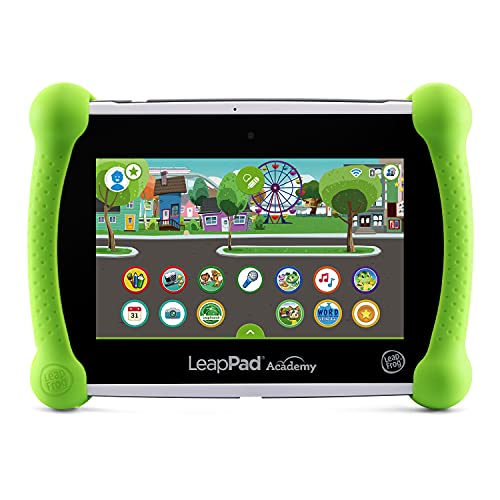
The LeapFrog LeapPad Academy Kids’ Learning Tablet in vibrant green blends the familiarity of Android with LeapFrog’s award‑winning educational expertise. Designed for children ages 3‑8, the tablet comes pre‑loaded with 20 carefully crafted learning apps and creativity tools that teach everything from early math to storytelling. A built‑in kid‑friendly browser, LeapSearch, lets little explorers safely surf curated websites and watch age‑appropriate videos, while the free three‑month trial of LeapFrog Academy provides a guided learning adventure that grows with your child’s skill level. Parents can expand the library by downloading popular Android apps or choosing from hundreds of games, videos, and music in the LeapFrog App Center (sold separately). The device runs on a rechargeable lithium‑ion battery, so there’s no need for constant AA replacements, and the sturdy, splash‑proof design can handle the inevitable drops and spills of daily play.
Pros
- All‑in‑one learning hub: 20 pre‑installed educational apps plus LeapSearch keep kids engaged without needing extra purchases right away.
- Scalable curriculum: LeapFrog Academy’s tiered lessons adapt to a child’s progress, making the tablet useful from preschool through early elementary years.
- Parent‑controlled content: The Android base and LeapFrog App Center let adults curate safe, age‑appropriate entertainment beyond the built‑in apps.
Cons
- Additional content costs: Many popular Android games, videos, and music must be purchased separately from the App Center.
- Battery life limits long trips: While rechargeable, the tablet may require a charge after a few hours of intensive use, which could be inconvenient on longer outings.
6. LeapFrog Epic 7″ Tablet for Kids

The Topelotek 7‑inch Kids Tablet is built especially for curious 3‑ to 12‑year‑olds. Its lightweight, shock‑proof case and dual‑system interface make it easy for little hands to navigate, while the 32 GB internal storage (expandable to 128 GB) provides plenty of room for photos, e‑books, and videos. Pre‑loaded with offline Montessori‑style learning apps, brain‑training games, STEM activities, and creative art tools, the tablet blends education and entertainment without needing constant internet access. Parental controls let you set screen‑time limits, filter content, and assign learning goals, helping kids develop healthy digital habits. A 3500 mAh battery and adjustable‑brightness display keep sessions long and eyes comfortable, and the rotatable stand frees the hands for drawing or watching videos on the go.
Pros
- All‑in‑one learning hub – offline educational apps cover literacy, math, science, and creativity.
- Robust safety features – parental controls, drop‑proof case, and eye‑protective display keep kids secure.
- Long‑lasting, portable power – 3500 mAh battery and lightweight design support outdoor and travel use.
Cons
- Limited to Android 10 – newer app updates may not be fully compatible.
- No built‑in camera – kids can’t take photos or video chat without an external accessory.
5. Amazon Fire HD 10 Kids Tablet

The Amazon Fire HD 10 Kids tablet (newest model) is a full‑featured 10.1‑inch HD device built for children ages 3‑7, not a toy. It ships with a 1‑year Amazon Kids+ subscription, a rugged kid‑proof case, and a 2‑year worry‑free guarantee, saving you up to $70 versus buying each item separately. The 1080p Full HD screen brings cartoons and books to life, while 3 GB RAM and 25 % faster performance than the previous generation keep apps running smoothly. With a 13‑hour battery, 32 GB internal storage (expandable up to 1 TB), and robust, phone‑controlled parental controls, you can set screen‑time limits, approve app requests, and filter content by age. The tablet partners with trusted family‑safety experts and offers thousands of ad‑free books, games, videos, and educational STEM activities from Disney, Nickelodeon, PBS Kids, and more. Parents love its four‑star‑plus rating and the peace of mind that comes with a free replacement guarantee if it breaks.
Pros
- All‑in‑one value bundle – tablet, case, and 1‑year Kids+ for a big discount.
- Strong parental tools – remote screen‑time limits, app approvals, and age‑based filters.
- Long‑lasting battery & expandable storage – 13 hrs of use and up to 1 TB for media.
Cons
- Subscription renewal – after the first year, Kids+ auto‑renews at $5.99 / month (cancellable).
- Expandable storage sold separately – you’ll need to purchase a microSD card for the full 1 TB capacity.
4. Amazon Fire HD 10 Kids Pro Tablet

The Amazon Fire HD 10 Kids Pro tablet is built for curious 6‑ to 12‑year‑olds who want a real tablet, not a toy. Its bright 10.1″ HD display brings movies, books and games to life, while the 32 GB of storage and a fast processor keep everything running smoothly. Out‑of‑the‑box you get a kid‑proof case with a built‑in stand/handle, a power adapter and a charging cable—so it’s ready for adventure the moment you unwrap it.
A full year of Amazon Kids+ is included, giving unlimited, ad‑free access to age‑appropriate books, videos, apps and games from Disney, Marvel, LEGO and creators like Mr. Beast. The Amazon Kids Parent Dashboard, awarded “Best Parental Controls” by Parents Magazine, lets you set screen‑time limits, approve content, and monitor usage from your phone. Built‑in safeguards protect privacy and block malware, while the 13‑hour battery lets kids learn or play all day without hunting for an outlet.
Pros
- Robust parental controls with remote screen‑time limits and activity reports.
- Ad‑free, curated content for a safe, distraction‑free experience.
- Durable case + 2‑year worry‑free guarantee makes it resilient for everyday kid use.
Cons
- After the first year, the Amazon Kids+ subscription rolls over to a monthly fee (starting at $5.99).
- The 32 GB storage may fill quickly for older kids who download many large games or videos.
3. Amazon Fire 7 Kids Tablet
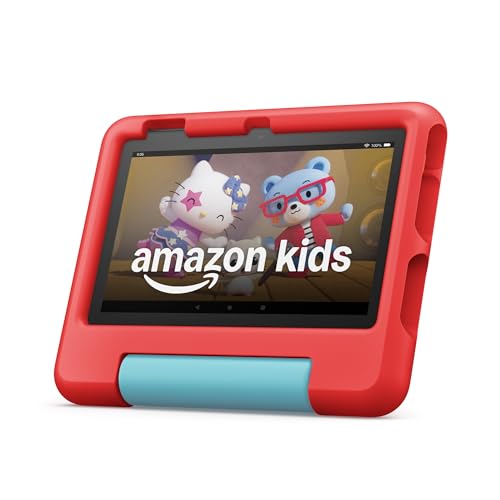
The Amazon Fire 7 Kids tablet (newest model) is the top‑selling 7‑inch device designed especially for children ages 3‑7. It comes in a vibrant red, paired with a rugged kid‑proof case that absorbs drops and bumps, so the tablet stays safe no matter how adventurous your little one is. Inside, 16 GB of storage (expandable up to 1 TB via microSD) holds thousands of ad‑free books, games, videos and apps, all curated through a 1‑year Amazon Kids+ subscription featuring trusted brands like Disney, Nickelodeon and PBS Kids. The intuitive Parent Dashboard lets you set age‑appropriate filters, educational goals, screen‑time limits, and even grant access to services such as Netflix or Disney+. With up to 10 hours of battery life, the tablet is ready for long car rides or bedtime stories, and the included 2‑year worry‑free guarantee means any breakage is replaced at no cost.
Pros
- All‑in‑one learning & entertainment – Amazon Kids+ provides thousands of ad‑free, educational titles in one subscription.
- Robust parental controls – Simple dashboard for age filters, time limits, and goal tracking.
- Durable & worry‑free – Kid‑proof case plus a 2‑year replacement guarantee give parents peace of mind.
Cons
- Subscription after the first year – After the included year, Kids+ renews at $5.99/month (cancellable anytime).
- Limited internal storage on base model – 16 GB may fill quickly without a microSD card.
2. Amazon Fire 7 Kids Tablet

The Amazon Fire 7 Kids tablet is the top‑selling 7‑inch device designed especially for children ages 3‑7. It comes in a bright blue, kid‑proof case and packs a 10‑hour battery, 16 GB of internal storage (expandable to 1 TB), and a full‑featured tablet experience—no toy gimmicks. The bundle saves up to $70 by pairing the tablet with a 1‑year Amazon Kids+ subscription, giving instant access to thousands of ad‑free books, games, videos, and educational apps from trusted brands like Disney, Nickelodeon, and PBS Kids. Parents enjoy a hassle‑free Parent Dashboard that lets you filter content by age, set learning goals, limit screen time, and even unlock extra services such as Netflix or Disney+. A 2‑year worry‑free guarantee means any breakage is replaced at no cost, and the sturdy case protects against drops and bumps.
Pros
- All‑in‑one learning & entertainment: Amazon Kids+ provides a curated, ad‑free library of educational and fun content.
- Robust parental controls: Easy dashboard to customize age‑appropriate content, set time limits, and monitor progress.
- Built for durability: Kid‑proof case + 2‑year guarantee gives peace of mind for active little hands.
Cons
- Subscription renewal: After the first year, Kids+ automatically renews at $5.99/month (cancellable anytime).
- Limited internal storage: 16 GB may fill quickly without a microSD card, especially with many apps and videos.
1. Amazon Fire 7 Kids Tablet (2023) 7

The Amazon Fire 7 Kids tablet (newest model) is the top‑selling 7‑inch tablet for children ages 3‑7, packed with ad‑free, kid‑focused content and robust parental controls. The bundle saves up to $70 by combining a full‑featured tablet, a 1‑year Amazon Kids+ subscription, and a rugged kid‑proof case—all in a fun purple finish. With a 10‑hour battery, the tablet stays ready for learning, reading, or streaming on the go. Choose 16 GB of internal storage (or upgrade to 32 GB) and expand up to 1 TB via microSD for endless books, games, and videos. The included 2‑year worry‑free guarantee means any accidental breakage is replaced at no cost. Amazon Kids+ gives access to thousands of ad‑free titles from Disney, Nickelodeon, PBS Kids, and more, plus STEM activities and language lessons. The intuitive Parent Dashboard lets you set age‑appropriate filters, time limits, and educational goals, while still allowing easy access to services like Netflix or Disney+ when you choose.
Pros
- All‑in‑one value bundle (tablet, 1‑year Kids+ subscription, protective case) saves money and simplifies setup.
- Parental peace of mind with easy dashboard controls, 2‑year guarantee, and safety‑first content curation.
- Long battery life & expandable storage keep the device ready for extended use and growing media libraries.
Cons
- After the first year, the Kids+ subscription auto‑renews at $5.99 +/month, which may add ongoing cost.
- The base 16 GB model can fill up quickly without a microSD card, especially if many apps or videos are downloaded.
Buying Guide
Choosing an educational tablet for kids means balancing safety, learning value, and ruggedness so the device can grow with them and survive everyday play. Look for models that combine parental controls, age‑appropriate content, and a build that can handle drops and spills.
- Screen quality and size: a bright, glare‑free display with a size that’s comfortable for small hands and eyes.
- Parental controls and content ecosystem: robust filtering, time limits, and access to curated educational apps.
- Durability and design: reinforced frames, rubberized corners, and a kid‑proof case to endure drops and spills.
- Battery life and performance: a long‑lasting battery and a processor that runs apps smoothly without lag.
- Price and warranty: good value for features, plus a warranty that covers accidental damage.
By weighing these factors, you can select a tablet that educates, entertains, and endures, giving both kids and parents peace of mind.
Frequently Asked Questions
Which tablet offers the best balance of durability, parental controls, and educational content for kids?
A top choice is the Amazon Fire HD Kids Edition. It comes with a rugged, kid‑proof case, a 2‑year worry‑free guarantee, and Amazon’s FreeTime (now Amazon Kids+) parental controls that let you set screen time limits, filter content by age, and monitor usage. The device also includes a subscription to a library of age‑appropriate books, games, and learning apps.
What features should I look for to ensure a tablet is safe and age‑appropriate?
- Robust parental controls – ability to set daily limits, approve apps, and filter web content.
- Durable design – reinforced corners, shatter‑resistant screen, and a protective case.
- Kid‑friendly UI – simplified home screen with large icons and easy navigation.
- Educational app ecosystem – access to reputable learning platforms (e.g., Khan Academy Kids, ABCmouse).
- Screen quality – low blue‑light mode or adjustable brightness to reduce eye strain.
How can I maximize the educational value of a kids’ tablet?
- Curate content – Install only vetted educational apps and set up playlists of instructional videos.
- Set clear usage rules – Use built‑in timers to enforce daily limits and schedule “tech‑free” periods.
- Engage together – Co‑play or co‑learn with your child; discuss what they’re exploring to reinforce concepts.
- Leverage built‑in learning tools – Many tablets include reading assistants, math challenges, and progress tracking that parents can review.
- Regularly review and adjust – Periodically check app usage reports and update parental settings as your child grows.
Conclusion
Choosing the right educational tablet for a child ultimately hinges on balancing safety, durability, and age‑appropriate learning tools with a user‑friendly interface that encourages curiosity rather than frustration. Prioritize devices that offer robust parental controls, sturdy construction, and a curated ecosystem of high‑quality, curriculum‑aligned apps. Consider how long the tablet will grow with your child, ensuring that it can adapt to evolving skill levels and interests without becoming obsolete. By focusing on these core criteria—security, resilience, engaging content, and scalability—you’ll equip your child with a reliable digital companion that supports both academic development and creative exploration.

