
7 Top Picks: Best 10‑Inch Tablet for Kids
Finding the perfect tablet for a child is more than a quick tech purchase; it’s about balancing durability, parental controls, educational content, and a size that fits small hands while still delivering a vivid, immersive experience. A 10‑inch screen hits that sweet spot, offering enough visual real‑estate for games and learning apps without becoming a cumbersome weight for a youngster to carry. With countless models flooding the market, it’s easy to feel overwhelmed by specs and price tags. In this guide we’ve cut through the noise to spotlight the seven top 10‑inch tablets that combine rugged design, kid‑friendly software, and solid performance, so you can make a confident, informed choice for your family.
7 Must-Have 10‑inch Tablets for Kids – Top Picks
We’ve tested each model for durability, parental controls, and fun features, so you can confidently choose the perfect tablet for your child.
7. Urao Kids Tablet 10

The URAO Kids Tablet is a 10‑inch Android 15‑powered learning companion designed for children ages 6‑12. Its 2.0 GHz octa‑core processor, 20 GB RAM and 64 GB internal storage (expandable up to 1 TB via micro‑SD) deliver smooth multitasking for games, videos, and educational apps. A full‑color 1280 × 800 IPS screen with low‑blue‑light technology and a one‑tap reading mode protects young eyes, while the built‑in dual cameras let kids explore creativity. The tablet ships in a soft, food‑grade silicone case with an adjustable stand, making it durable and easy to carry for travel or classroom use. Parental controls are pre‑installed, allowing parents to set profiles, limit screen time, and curate safe content without constant supervision. A high‑capacity lithium‑polymer battery provides up to 6 hours of active use and can be fully recharged in just 1.5 hours through a USB‑C fast‑charge port.
Pros
- Powerful performance – Octa‑core CPU + 20 GB RAM handles multiple apps and games effortlessly.
- Robust safety features – Android 15, built‑in parental controls, eye‑care display, and protective silicone case.
- Long‑lasting, fast‑charging battery – Up to 3 days standby, 6 hours active use, full charge in 1.5 hours.
Cons
- Micro‑SD card not included – Expansion to 1 TB requires purchasing a separate card.
- No cellular connectivity – Tablet relies on Wi‑Fi only, which may limit use in areas without a stable network.
6. ZZB 10 Inch Android Tablet
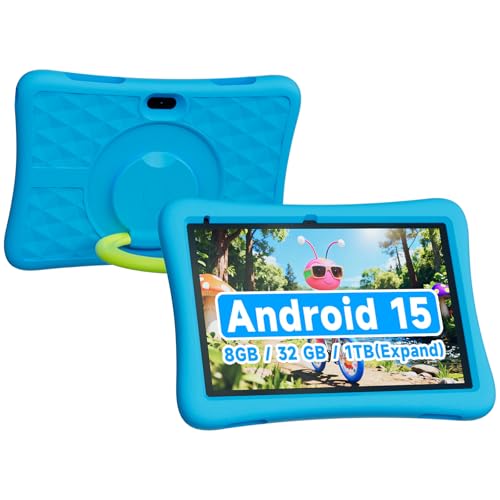
The ZZB 10‑inch Android 15 tablet is built especially for kids, combining a vibrant 10.1″ display with a rugged EVA case that absorbs drops and spills. Running Android 15, it comes pre‑loaded with age‑appropriate learning apps, eBooks, and games, while parents can set screen‑time limits and filter content for a safe digital environment. Under the hood, the tablet packs 8 GB (3 GB + 5 GB extended) RAM, delivering lag‑free gaming and smooth multitasking. With 32 GB internal storage and support for up to 1 TB microSD, there’s plenty of room for movies, music, and educational resources. Dual cameras—2 MP front for video chats and 8 MP rear for photos and school projects—encourage creativity. A robust 6000 mAh battery provides hours of uninterrupted play, perfect for trips, classroom use, or bedtime stories.
Pros
- Kid‑friendly Android 15 OS with parental controls and a curated app library.
- Generous memory & storage (8 GB RAM, 32 GB + 1 TB microSD) keeps apps responsive and media plentiful.
- Durable shock‑absorbing case and long‑lasting battery make it ideal for active youngsters.
Cons
- The 8 MP rear camera is adequate for play but may fall short for serious photography.
- No stylus is included, which could limit drawing or note‑taking activities for older kids.
5. ApoloSignage 2025 Kids Tablet

The ApoloSignage 2025 Kids Tablet brings the power of Android 15 to little hands. Its octa‑core CPU and 8 GB (4 GB + 4 GB) RAM deliver buttery‑smooth performance, while 64 GB of internal storage—expandable up to 1 TB—keeps all games, videos, and school projects at your fingertips. The 10‑inch IPS HD screen (1280 × 800) offers crisp, vibrant colors, and built‑in eye‑comfort tech with auto‑brightness and blue‑light reduction protects young eyes during long study sessions. Pre‑installed Google Kids Space provides educator‑approved apps for ages 3+, from coloring and crafts to interactive stories and puzzles, all safely gated by robust parental controls that let you set content filters, learning goals, and screen‑time limits. A rugged, ultra‑slim case with an adjustable stand shields against drops, while the 5000 mAh battery ensures hours of on‑the‑go learning and play. Whether it’s a birthday, holiday, or just a surprise, this tablet is ready to spark curiosity wherever your child roams.
Pros
- High‑performance Android 15 + Octa‑core – seamless multitasking and fast app launches.
- Kid‑focused ecosystem – Google Kids Space + strong parental controls keep content safe and educational.
- Durable, portable design – lightweight body, protective case, and adjustable stand for travel‑ready use.
Cons
- Limited to 10‑inch screen size – may feel small for older kids who prefer larger displays.
- No cellular connectivity – only Wi‑Fi, so offline use depends on pre‑downloaded content.
4. SHARECLOUD 10 Kids Tablet

The SHARECLOUD 10‑inch Kids Tablet blends robust performance with kid‑friendly safety. Powered by an Allwinner A333 processor and running an ad‑free Android 15 OS, it offers 24 GB of memory (4 GB physical + 20 GB virtual) and 64 GB of internal storage, so games, videos, and educational apps run smoothly without lag. The 10.1‑inch IPS touchscreen delivers a crisp 1280 × 800 resolution, while low‑blue‑light technology and an eye‑protection mode keep little eyes comfortable during long study sessions.
Parental control is built in: parents can create individual accounts, set daily screen‑time limits, and filter apps to ensure a safe digital playground. The tablet’s rugged EVA case and adjustable stand protect against drops and make hands‑free viewing easy, while the 6600 mAh battery—charged via USB‑C—provides up to 8 hours of mixed use. Wi‑Fi 6 and Bluetooth 5.4 guarantee fast, stable connections for streaming and multiplayer play. A dual‑camera setup adds creative fun, and the device comes in a vibrant purple with a two‑year warranty, making it an ideal gift.
Pros
- High‑performance specs (24 GB RAM, 64 GB ROM) keep apps responsive.
- Comprehensive parental controls let adults manage content and screen time.
- Durable, kid‑centric design with EVA case, stand, and eye‑care display.
Cons
- Battery life of ~8 hours may require midday charging for heavy use.
- Expandable storage capped at 1 TB, which could be limiting for power users.
3. Pritom T10 Kids Tablet, 32GB, Android.

The PRITOM 10‑inch Kids Tablet is built especially for young explorers aged 3 +. Running Android 14 on a quad‑core processor, it delivers smooth performance for games, videos, and learning apps. The 1024 × 600 IPS HD display offers bright, vivid colors while the Eye‑Healthy Mode softens the backlight to protect little eyes during long sessions. A robust, child‑safe EVA foam case with an adjustable stand shields the screen from drops and lets kids comfortably draw or watch content at the perfect angle.
With iWawa pre‑installed, kids can dive into educational games, AR Zoo adventures, and curated content. The Parental Control Mode lets you create individual profiles, filter apps, set screen‑time limits, and lock safe web browsing—all managed from a parent dashboard. A 6000 mAh battery keeps the tablet alive for hours, perfect for road trips or classroom use. Connectivity includes Wi‑Fi 6, Bluetooth, GPS, and dual cameras for photos and video chats. Storage starts at 32 GB (expandable to 512 GB) and 2 GB RAM ensures quick multitasking.
Pros
- Comprehensive parental controls – profile‑based limits, content filtering, and safe browsing.
- Durable kid‑proof case – EVA foam protects drops and provides an adjustable stand for hands‑free use.
- Eye‑Healthy Mode & IPS display – reduces eye strain while delivering crisp visuals.
Cons
- Limited RAM (2 GB) may affect performance with very demanding games or multiple apps.
- Expandable storage not included – you’ll need to purchase a microSD card separately for the full 512 GB capacity.
2. ZZB Kids Tablet 10 Inch

The ZZB Kids Tablet is a 10‑inch Android 15.0 device built especially for curious youngsters. It arrives pre‑loaded with a curated selection of kid‑friendly apps, games, and educational content, while robust parental controls let you set screen‑time limits and filter what’s viewable. Powered by 8 GB of RAM (3 GB native + 5 GB virtual expansion) the tablet handles multitasking smoothly, and the 32 GB of internal storage—expandable up to 1 TB via microSD—gives plenty of room for apps, videos, and photos.
Capture moments with the 2 MP front camera for selfies and video calls, and the 8 MP rear camera for photos and creative projects. A high‑capacity 6000 mAh battery keeps the fun going for hours, whether on a road trip or a day at home. The vibrant 10.1‑inch display is protected by a rugged EVA case that absorbs drops and bumps, making the tablet ready for active play.
Pros
- Kid‑focused Android 15.0 OS with parental controls and pre‑installed educational apps.
- Smooth performance thanks to 8 GB RAM and up to 1 TB expandable storage.
- All‑day battery and durable EVA case ensure durability and long‑lasting use.
Cons
- The rear camera’s 8 MP resolution is modest compared to premium tablets, which may limit photo quality.
- No stylus is included, so drawing or handwriting activities require an additional accessory.
1. COLORROOM 2026 Android Tablet

The COLORROOM 2026 Upgraded Android 15 Tablet is a kid‑friendly powerhouse that blends robust performance with thoughtful safety features. Its octa‑core CPU and the brand‑new, AI‑enhanced Android 15 system keep everything running buttery‑smooth, whether your child is streaming cartoons, video‑chatting with grandparents, or diving into e‑books. With 10 GB (4 GB + 6 GB) of RAM and 64 GB of internal storage—expandable up to 1 TB via micro‑SD—you’ll never run out of space for apps, photos, or movies.
The 10.1‑inch anti‑blue‑light display (1280 × 800) offers vivid colors and a wide viewing angle while protecting young eyes during long sessions. Pre‑installed Google Kids Space delivers age‑appropriate educational content, and the intuitive parental‑control dashboard lets you set content filters, learning goals, and screen‑time limits. A rugged 6000 mAh battery provides 8‑12 hours of uninterrupted play, and dual stereo speakers deliver clear, immersive audio for music and videos on the go.
Pros
- Powerful performance – Octa‑core CPU + 10 GB RAM handles multitasking and media effortlessly.
- Eye‑care display – Anti‑blue‑light panel with auto‑brightness keeps vision safe during extended use.
- Kid‑centric ecosystem – Google Kids Space + robust parental controls create a secure, educational environment.
Cons
- Weight – The 6000 mAh battery adds bulk, making the tablet slightly heavier for very small hands.
- MicroSD not included – Expanding storage to 1 TB requires purchasing a separate micro‑SD card.
Buying Guide
When choosing a 10‑inch tablet for kids, prioritize safety, ease of use, and long‑term value. A device that balances robust parental controls, kid‑friendly hardware, and engaging content will grow with your child.
- Durable construction: Look for reinforced frames, shock‑absorbing cases, and spill‑resistant screens to survive drops and accidents.
- Parental control suite: Choose a tablet with customizable screen‑time limits, app approvals, and web filtering to keep browsing safe.
- Battery life and performance: Opt for at least 8‑hour battery life and a processor that handles educational games smoothly.
- Content ecosystem: Ensure access to a curated kids store or subscription service that offers age‑appropriate apps, books, and videos.
- Value for money: Compare price points, warranty length, and included accessories like protective cases or stylus pens.
By weighing these factors, you’ll find a tablet that entertains, educates, and endures as your child grows. A thoughtful purchase now saves frustration and expense later.
Frequently Asked Questions
What should I look for in a 10‑inch tablet for kids?
- Durability – reinforced frame, rubberized corners, and a robust screen protector.
- Parental controls – built‑in app lockers, screen‑time limits, and web filtering (often via a companion app).
- Battery life – at least 8–10 hours of mixed use so it lasts a full day of school and play.
- Content ecosystem – access to kid‑friendly app stores or curated libraries (e.g., Amazon Kids+, Google Play Kids).
- Price vs. performance – a modest processor (e.g., Snapdragon 450 or MediaTek Helio P22) is sufficient for games, videos, and e‑reading without breaking the bank.
Which 10‑inch tablets are top‑rated for children in 2024?
| Tablet | Key Kids Features | Approx. Price (USD) |
|---|---|---|
| Amazon Fire HD 10 Kids Edition (2023) | Kid‑proof case, 2‑year worry‑free guarantee, 1 yr Amazon Kids+ subscription, robust parental controls. | $149 (incl. case & warranty) |
| Lenovo Tab P11 Plus Kids Pack | Kids mode with Google Family Link, detachable bumper case, 75 Hz display, Dolby Atmos speakers. | $199 (with case) |
| Samsung Galaxy Tab A7 Lite Kids Bundle | Samsung Kids Home, easy‑switch child profile, sturdy silicone cover, long‑lasting battery. | $179 (bundle) |
| Apple iPad (10th gen) with Rugged Case | Apple Screen Time, App Store restrictions, high‑resolution display, strong app ecosystem. | $329 (tablet only) + $49 case |
All listed models have a 10‑inch screen, parental‑control suites, and optional protective accessories.
How can I protect a 10‑inch tablet and set up parental controls?
- Apply a screen protector – tempered glass or a high‑quality film to guard against scratches.
- Use a rugged case – bumpers or silicone covers absorb drops; many kids‑edition bundles include them.
- Enable built‑in parental controls:
- Amazon Fire → Settings → Parental Controls → set a PIN, limit apps, and manage Amazon Kids+ content.
- Google/Android → Settings → Digital Wellbeing & Parental Controls → Family Link app for screen‑time limits and app approvals.
- Apple iPad → Settings → Screen Time → create a Child Account, set Downtime, App Limits, and content restrictions.
- Create a separate child profile (if the OS supports it) so the child only sees approved apps and settings.
- Regularly review usage reports provided by the parental‑control app to adjust limits as needed.
Following these steps keeps the tablet safe from physical damage and ensures a controlled, age‑appropriate digital experience.
Conclusion
Choosing a 10‑inch tablet for kids boils down to balancing ruggedness, safety features, and learning value. Look for devices built to survive drops, with water‑resistant cases and reinforced screens, while offering robust parental controls that let you manage screen time, app access, and content filters. A vibrant, responsive display and a battery that lasts through a full day of play keep children engaged without constant recharging. Affordable pricing combined with a solid warranty ensures peace of mind for parents. By focusing on these core criteria—durability, control, educational content, and long‑lasting performance—you can select a tablet that grows with your child’s curiosity and needs.

